Lighthouse vs Beacons Beam: one drafts replies, the other works the whole deal
Beam answers the email. Lighthouse works the deal, from the first reply to the paid invoice, and it prices every brand like it knows what they can afford.
By Ryan Figueroa, Co-founder of Lighthouse, full-time creator. .
Full disclosure: my brother Kevin and I build Lighthouse, so I'm biased. So is Beacons. Their own comparison of AI agents for creators ranks Beam first and sums up Lighthouse in one line: "reads and replies to brand emails."
That's like describing a manager as someone who answers your email. Technically true. Misses the part you'd actually pay for.
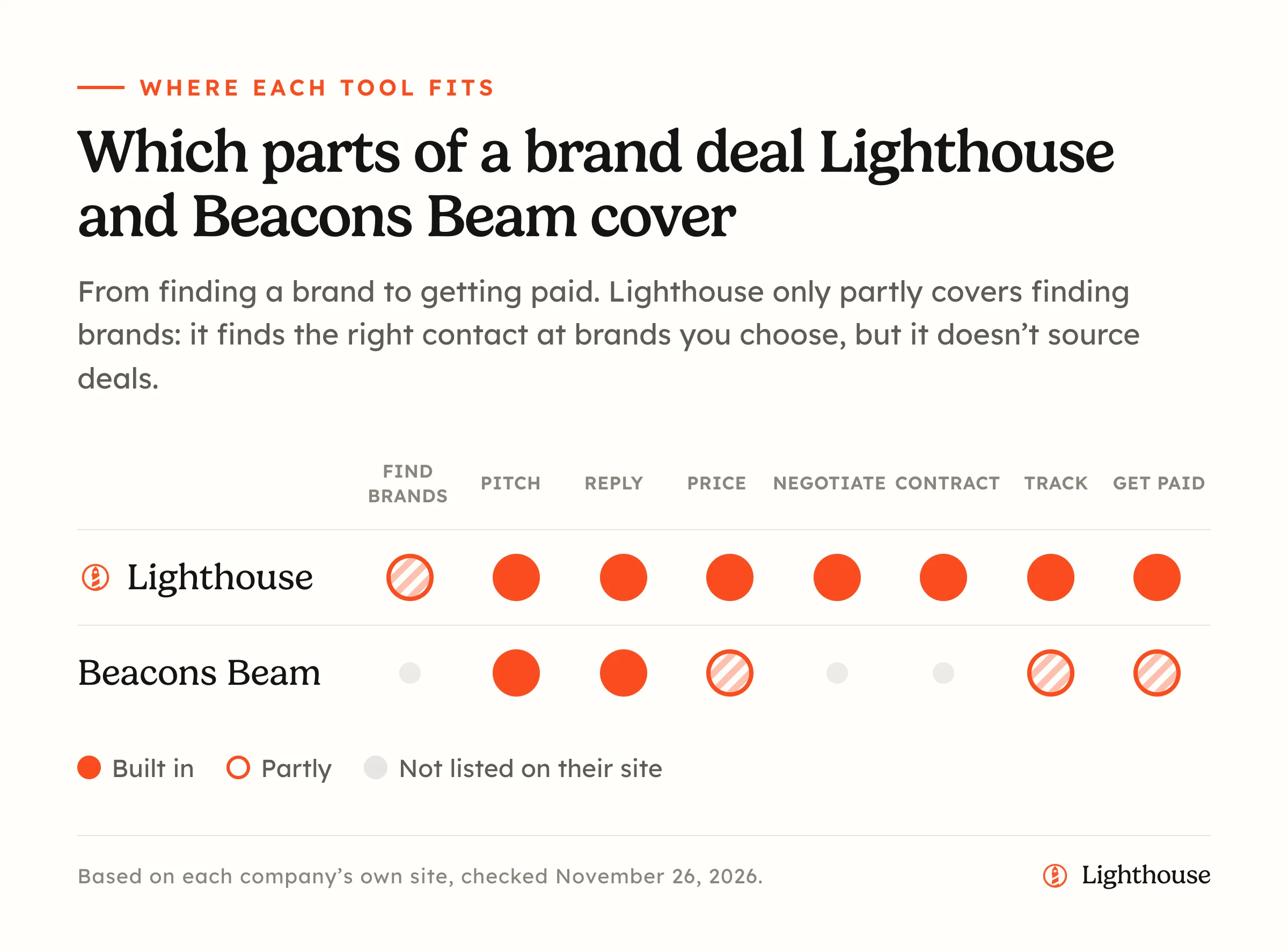
Beam is your rate card with a reply button attached. That's handy, and it covers about the first ten minutes of a brand deal. Everything that decides how much you make happens after that, and that's where Lighthouse lives. Here's the full comparison, with links to Beacons' own pages so you can check every claim I make about Beam.
I'm a full-time creator with 95K followers on Instagram and deals with Adobe, ASUS and Perplexity, and I run my own deals through Lighthouse.
Lighthouse vs Beam at a glance
| Lighthouse | Beacons Beam | |
|---|---|---|
| Price | $99/month or $940/year | Free on every Beacons plan |
| Commission | 0% | 0% |
| Inboxes | Gmail and Outlook | Gmail |
| Drafts brand replies in your voice | Yes | Yes |
| How it prices an offer | From your past deals, the brand asking and what they want | From your rate card. Beacons says you still set the price. |
| Negotiation | Drafts counters, pushes harder when the brand can pay more | Not described on Beam's pages |
| Deal tracking | A project page for every deal, built automatically | Ask Beam what's coming up, including exclusivity end dates |
| Contract review | Flags red flags and terms that changed from the email thread | Not listed |
| Contract signing | In the app | Not listed |
| Invoicing | Built in, with follow-ups on late payments | A separate free Beacons invoicing tool |
| Pitching | Finds the right brand contact and drafts the pitch | Drafts pitches from your captions, numbers and rate card |
| Media kit | Yes | Yes |
| Link in bio and store | No | Yes, it's the rest of Beacons |
| Sends without your approval | No | No |
Beam details come from Beacons' AI agents comparison and its usage rights guide, both updated November 18, 2026. If Beacons adds features, check their pages for the latest.
What does Beacons Beam do?
Beam is Beacons' AI teammate. You connect the Gmail inbox brands email you at, and Beam finds the brand offers and drafts replies and pitches using your captions, audience numbers and rate card. It shows you each draft and asks before sending, and if you link your phone, it can text you when a brand is waiting.
It's free on every Beacons plan, and it sits next to the rest of Beacons: your link in bio, store, media kit and a free invoicing tool. Beacons says that if brand deals aren't open on your account yet, you'll see a waitlist.
If you get a few brand emails a year and already live in Beacons, it's a solid free tool. A reply drafted from your rate card beats a reply you forget to send.
What does Lighthouse do?
Lighthouse is the HQ for your brand deals, with an AI assistant at the center that thinks like a good manager. It connects to Gmail or Outlook, and on day one it builds your whole workspace: your active deals show up automatically, and every brand email already has a reply drafted in your voice.
Then it works the deal, and you approve every move:
- Reads the offer. It learns from your past brand deals, so it knows what you've charged, what you've agreed to and what you've turned down.
- Prices it for the brand in front of you. A Fortune 500 company with an ad budget doesn't get the same number as a two-person startup, and usage rights, whitelisting and exclusivity all get priced in.
- Negotiates. When the brand counters, it drafts your counter, built on how your past deals actually went.
- Checks the contract. It flags red flags and anything that changed from what you agreed over email, and you sign in the app.
- Tracks the work. Every deal gets a project page with deliverables, deadlines, documents and to-dos, synced to your calendar.
- Gets you paid. It creates the invoice and follows up when a brand pays late.
You also give your assistant a name. Mine is Matt, and brands negotiate with Matt. Matt holds the line on price. I get to be the nice guy.
It also has a media kit to send brands, finds the right contact at brands you want to pitch and drafts the pitch, and it can watch creators in your niche and add their brand partners to your list automatically. Over 50 full-time creators use it now.
Where's the real difference? Pricing the deal
A rate card is one number per deliverable. Brand deals don't work like that, and the creators who leave the most money on the table usually aren't wrong about their rate. They're quoting the same number to everyone.
Say your rate card says $2,000 for a Reel. In the same week, a two-person startup and a Fortune 500 brand both email you about one Reel. A rate card quotes them both $2,000. The Fortune 500 brand says yes in an hour, and you never find out what it had actually budgeted.
Lighthouse reads who's asking and what they want. The big brand with an ad budget, a 90-day paid usage window and a category exclusivity clause gets a much higher number than the startup asking for one organic post. The startup still gets a fair quote. The big brand just doesn't get your small-brand price anymore.
Beacons' own data makes the case for me. Its usage rights guide says deals with paid usage closed at more than double the median fee of deals with no usage terms. That's the money a rate card leaves behind, and Beam's draft quotes your rate card. Beacons says plainly that you still set the price.
I've watched creators realize this live on a call. When I opened a real invoice for a $15,000 UGC deal, one creator's first reaction was "I need to up my rates." That's the gap. More on pricing in how much to charge for a brand deal.
What happens after the first reply?
Most of the money in a brand deal gets made or lost after the first email. This is the part a reply drafter doesn't touch.
- The contract. Brands usually send their own contract, often written by someone who wasn't in your email thread. You agree to 90 days of usage over email and the contract says 120. Lighthouse checks the contract against the thread and flags it. Beacons doesn't list contract review for Beam at all. Here's what to look for.
- The deliverables. Lighthouse keeps every deal on its own project page with dates and to-dos. With Beam, you can ask what's coming up, including exclusivity end dates it picked up from your emails.
- Getting paid. Lighthouse creates the invoice inside the deal and follows up when payment is late. With Beacons, invoicing is a separate tool. Chasing money is half of this job, and it shouldn't live in a different tab from the deal. See what to do when a brand doesn't pay.
What do creators say after seeing both kinds of tools?
I've talked to a lot of full-time creators about how they run their deals, and some of them were already paying for an AI tool that drafts brand replies.
One creator was paying about $50 a month for an AI tool that drafted her brand replies. Her verdict after seeing Lighthouse was that the other tool did it "not through a creator lens," and that only about half her emails even got a draft. By the end of the call she was "quite excited to cancel" it.
Another creator, who was also talking to management agencies at the time, put it simply: "I do really, really, really think that this AI that you created is the best one that I've seen."
And from Claudia Von, who runs @therichgoodwill with about 1M followers: "It's built for a creator versus me trying to hack a CRM... This is literally going to solve all the pain that I'm experiencing right now!"
That's the difference creators notice. A reply drafter saves you a few minutes per email. A tool built around the whole deal changes how much each deal pays and how much of it you actually collect.
Where does Beam win?
I'd rather you pick the right tool than the one I make, so here's where Beam is the better call.
- It's free. Hard to beat. If you do a few brand deals a year, $99 a month is a lot to justify.
- You already use Beacons. Your link in bio and store are there, and Beam lives next to them.
- You only want help with replies. If your rates are set, you sign brands' contracts as they are and you track invoices fine on your own, a reply drafter might be all you need.
- Texts. Beam can text you when a brand is waiting. Lighthouse has a mobile app instead.
Which should you choose?
- Choose Beam if you're on Beacons, you do a few deals a year, and you mostly want replies drafted from your rate card.
- Choose Lighthouse if brand deals are a real part of your income. You want every offer priced for the brand in front of you, counters drafted for you, contracts checked against what you agreed, and invoices that actually get paid, all in the same place as the email.
- Choose a human manager if you want someone with existing brand relationships to go out and land deals for you, and you're fine paying 10% to 20% of everything. The math is in how much influencer managers take.
You can also use both. Beam is tied to your Beacons page and store, and Lighthouse handles your deals, so there's no conflict as long as you only send each reply once.
For the rest of the field, including Emma, Creator World and ChatGPT, see the best AI tools for managing brand deals.
Frequently asked questions
Is Beacons Beam free?
Yes. Beacons says Beam is free on every Beacons plan, including the free plan, as of October 21, 2026. Some accounts may see a waitlist for brand deal features. Lighthouse is $99 a month or $940 a year with 0% commission and a free trial.
Does Beacons Beam review contracts?
Beacons doesn't list contract review as a Beam feature. Lighthouse reviews every brand contract, flags red flags like perpetual usage or unpaid exclusivity, and checks the terms against what you agreed in the email thread before you sign.
Does Beam work with Outlook?
Beacons describes Beam as connecting to Gmail. Lighthouse works with Gmail and Outlook, including Google Workspace and Microsoft 365 custom domains.
Will either tool send emails without my approval?
No. Both draft by default and wait for you. With Lighthouse, nothing leaves your inbox until you click send, nobody on the team can read your inbox, your data is never used to train AI models, and you can delete everything at any time.
What's the best Beacons Beam alternative?
If you want more than reply drafts, Lighthouse is the alternative built around the whole deal: pricing each offer for the brand asking, drafting counters, contract review, deal tracking and invoicing, for a flat fee with no commission. If you'd rather have an AI manager you text, look at Emma from Retrograde.
About the author: Ryan is a full-time creator and filmmaker with 95K followers on Instagram (@ryansfigueroa) and brand deals with Adobe, ASUS, Perplexity and more. He has never signed with a manager or agency. He builds Lighthouse with his older brother Kevin, and has talked with over a hundred full-time creators about how they price, sign and get paid for their deals.
Try Lighthouse free for 30 days. $99/mo, 0% commission.